NFL Collect by Topps®
The Topps Company, Inc.Sports
4.62.62K Reviews
- Version
- 40.5.0
- Installs
- 500.00K
- Age Rating
- Everyone
Screenshots
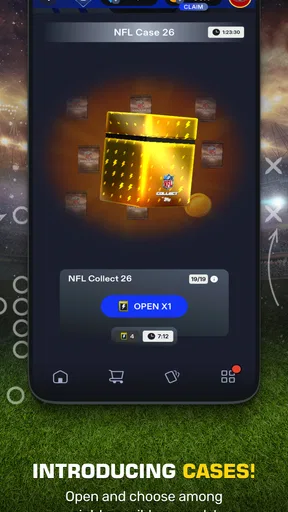
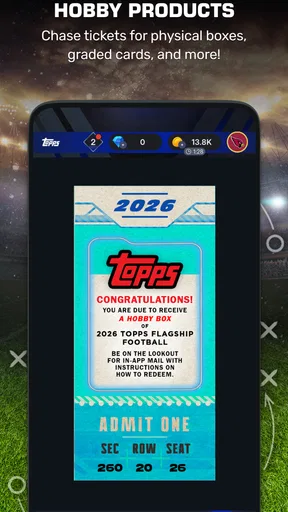
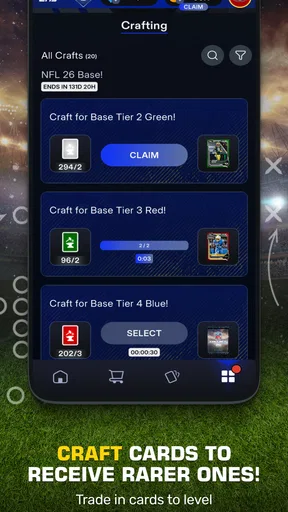
Our Review of NFL Collect by Topps®
 Analysis by Appyee
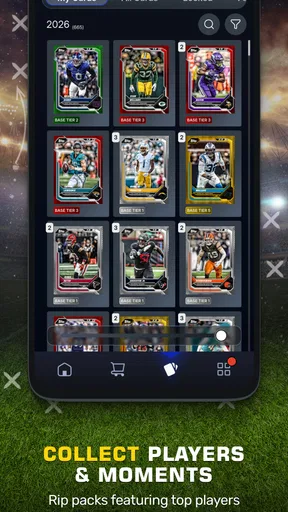
If you enjoy collecting NFL cards but want something more active than sorting physical cards into binders, NFL Collect by Topps® offers a digital version built around collecting, trading, and chasing notable moments. I found it most interesting when I treated it as a small daily hobby rather than a game I had to rush through. The app sits in the Sports category, comes from The Topps Company, Inc., and is free to install for Everyone.
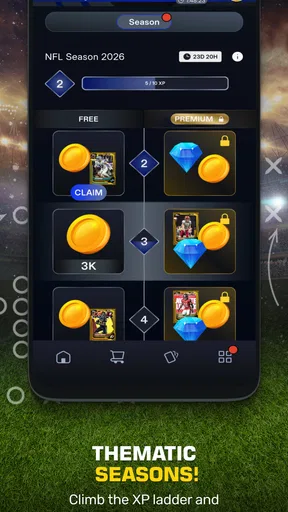
The basic appeal is easy to understand: build a collection, look for players you care about, exchange cards with other fans, and work toward rewards such as hobby boxes through tickets. That combination gives the app more purpose than a simple gallery. At the same time, it is not the best fit for every football fan. The experience depends heavily on patience, attention to collection details, and comfort with optional spending.
Where NFL Collect Usually Gets Difficult
The first friction point is that the app asks you to think like a collector, not just a player. In a conventional sports game, you normally know what to do next: play a match, improve a team, or complete a challenge. Here, the satisfying part comes from understanding what you have, what you still want, and which cards or tickets are worth pursuing. That slower rhythm can feel confusing if you expect constant on-field action.
I also noticed that collecting apps can become difficult when several goals compete for attention. You may want a particular player, a complete set, better trade material, or enough tickets for a physical reward. Those goals do not always point in the same direction. A card that is unimportant to your personal collection may still be useful in a trade, while a card that looks exciting may not help you finish the group you actually care about.
My best advice is to choose a collecting objective before spending much time in the app. For example, you might focus on one team, one group of players, or simply on learning the trading system. This prevents the common mistake of opening packs or accepting trades without knowing why you are doing it. The strongest way to use NFL Collect is to give every action a purpose.
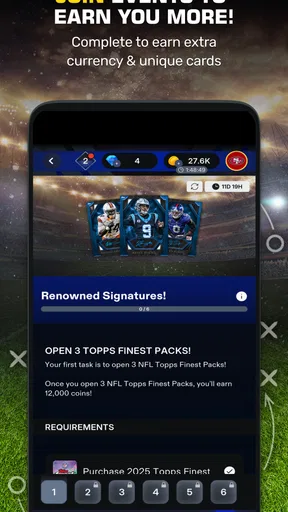
The store summary highlights chasing hits, collecting big names, trading with fans, and redeeming tickets for hobby boxes. In practice, those elements appeal to different kinds of users. Chasing exciting cards suits someone who enjoys surprise and scarcity. Trading suits a person who likes negotiation. Ticket redemption is more goal-oriented, while ordinary collection building is the calmer option for someone who prefers steady progress.
The app has an average rating of 3.3 from around 7,400 ratings, with about 2,600 written reviews. I would read that as a sign to keep expectations realistic. It is appealing enough to attract a substantial audience, but the experience is not universally smooth. The rating makes sense for a hobby app where enjoyment can depend on connection quality, account state, collection organization, and how comfortable someone is with in-app purchases.
Why the first session can feel less clear than expected
New users often want to know whether they are supposed to collect casually or optimize every move. I would start casually. Look through the available collection areas, identify how cards are organized, and learn where trades and tickets fit into the overall routine. Trying to maximize everything immediately makes the app feel more complicated than it needs to be.
Another source of uncertainty is the difference between owning a card and having a useful collection. Ownership is only the beginning. A card may matter because it completes a personal target, supports a trade, or contributes to a broader objective. Before exchanging anything, I recommend checking whether it is a duplicate, whether it belongs to a group you are building, and whether you would regret losing it later.
This simple pause is especially valuable for new collectors. Digital items are easy to move quickly, and the excitement of a new offer can override careful thinking. I prefer to keep a small mental shortlist of cards I will not trade and another list of cards I am willing to use as trade material. Even without a formal spreadsheet, that division makes the experience easier to manage.
Setup Checks Before Blaming the App
NFL Collect supports devices running Android 7.1 or later, and the current version is 40.3.0. Before installing, I would check the operating system and make sure the device has enough free space for a current app installation. That is a basic step, but it avoids wasting time troubleshooting an app on hardware or software that is not supported.
The app is free, which makes it easy to try without committing money at the start. However, optional purchases range from $0.99 to $99.99 per item. I strongly suggest deciding on a personal spending limit before exploring the collecting loop. The presence of a free entry point does not mean every part of the hobby will feel equally satisfying without purchases, and a clear limit helps keep the app enjoyable rather than impulsive.
For a clean first setup, I would use a stable connection, install the latest available version, and allow the initial screens to finish loading before repeatedly tapping buttons. If a collection page appears incomplete, I would close and reopen the app once rather than immediately assuming the cards are gone. Temporary loading problems can make a collection look different from its actual state.
It is also worth paying attention to the account details you use during setup. A collecting app is more frustrating when you move between devices without remembering how you originally signed in. Keep your login method consistent and avoid creating multiple accounts simply because the first screen takes longer than expected. Duplicate accounts can make it harder to tell where your collection or progress belongs.
When purchases are involved, I would be especially careful. Confirm the item, check that the correct account is active, and avoid pressing the purchase control repeatedly if the screen seems slow. If a transaction appears delayed, give it time to resolve before trying again. Repeated taps can create confusion about whether an order went through.
A sensible first-day routine
My preferred first-day routine is deliberately modest. I would install the app, explore the collection areas, inspect the trading section, and learn how tickets are presented. Then I would decide whether the basic collecting loop is enjoyable before buying anything. This approach answers the most important question early: do you like the hobby itself, or are you only reacting to the promise of a rare card?
I would also avoid trading immediately. Spend the first session learning what your cards look like and which ones you personally value. A few minutes of observation can prevent an exchange that feels disappointing later. This is one of the less obvious advantages of slowing down: it gives you a reference point for judging future offers instead of treating every new card as automatically better.
Families should find the Everyone age rating reassuring, but younger users may still need guidance around optional purchases and trading decisions. The age rating describes suitability, not financial judgment. If a child uses the app, I would establish purchase rules and explain that collecting does not require chasing every attractive item.
Recovering a Stalled Collection Workflow
When something seems stuck, I would troubleshoot in layers. First, check whether the issue affects one screen or the whole app. If only a collection image or trade area is slow, wait briefly, return to the previous screen, and try again. If every section behaves strangely, close the app completely and reopen it. This basic distinction helps separate a temporary page problem from a broader device or connection issue.
Next, check the connection by switching between a reliable Wi-Fi network and mobile data, if available. A weak connection can make digital collections feel inconsistent because images, offers, or account information may load at different speeds. I would avoid making a trade or purchase while the connection is unstable. The safest workflow is to wait until the relevant details are visibly settled.
If a card or ticket seems missing, do not immediately repeat the action that preceded the problem. First, revisit the collection and look for filters, sorting choices, or a different section that may be hiding the item. Collecting interfaces often present information in several views, and a changed filter can make a card appear absent when it is simply outside the current display.
For trades, I recommend taking a screenshot or noting the important details before confirming. This is not about expecting something to go wrong; it is a practical record of what you intended. It also helps you explain the situation clearly if you later need support. Keep the description factual: what you selected, what screen you reached, and what changed afterward.
Purchases deserve a separate recovery approach. If the store or payment screen does not respond, do not keep tapping. Check whether the purchase has already been processed before attempting anything again. If the item does not appear after restarting and confirming the account, gather the transaction details and use the app’s official support route. Clear records are more useful than a long, emotional explanation.
Another useful habit is to make one change at a time. Do not uninstall the app, change accounts, switch networks, and alter device settings all at once. That can remove the clues needed to understand the problem. Restarting first, checking the connection second, and verifying the account third gives you a much cleaner troubleshooting path.
How to protect your collection from avoidable mistakes
I would create a simple personal inventory outside the app, especially if you become an active trader. It does not need to be elaborate. Record the cards you consider essential, the cards you are willing to exchange, and any ticket progress you do not want to forget. This is helpful when the collection grows and the excitement of opening new items makes it harder to remember what matters.
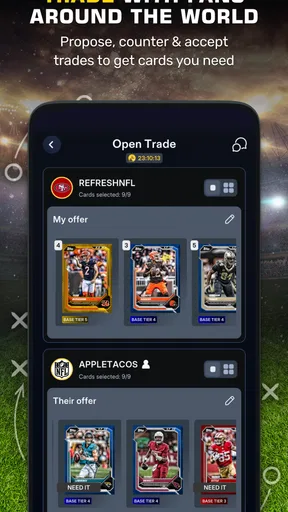
Before confirming a trade, read the offer from both sides. Check the exact card names and quantities, then ask whether the exchange improves your collection goal. A visually impressive offer may still be poor for you if it removes a card you were using to complete a set or build a team-focused group. Trade for your collection plan, not for the emotional high of receiving something new.
I would use the same discipline with tickets. Treat them as a long-term resource until you understand how redemption works in your own routine. If the goal is a hobby box, rushing to spend tickets can be less satisfying than waiting until you know which reward best matches your collecting priorities. The right choice depends on whether you value immediate excitement or a more deliberate milestone.
When the App Is Not the Cause
Not every problem comes from NFL Collect itself. An older device, limited free storage, unstable network service, or an outdated operating system can produce slow loading and failed sessions. Since the app requires Android 7.1 or later, checking the device version is a sensible first filter. If other apps are also slow, the wider device environment deserves attention before you judge this one.
Account confusion is another common culprit. If a collection appears different after switching devices, verify that you are using the same sign-in method and account. The temptation is to start over, but that can make the situation harder to untangle. I would first identify the original account, then restart the app and inspect the collection again.
Payment problems may also originate with the app store, the payment method, or a device-level restriction rather than the collection service. That is why I would not assume that reinstalling will solve a purchase issue. Reinstalling can be disruptive, while checking the transaction record and account first gives you better information.
Notifications and background behavior can be affected by battery-saving settings or network restrictions. If you are waiting for an update or an offer, opening the app directly is more reliable than assuming a notification will always arrive at the moment you expect. I would also avoid judging the entire service based on one delayed alert.
Compared with physical NFL cards, this app is more convenient for carrying a collection, browsing trades, and pursuing digital goals without a binder. Physical cards still win for tactile enjoyment, display value, and the feeling of owning something you can hold. Compared with a traditional console or mobile football game, NFL Collect is not a substitute for playing matches. Its pleasure comes from collecting decisions, not controlling athletes on the field.
Compared with a basic sports news app, it offers a much more focused hobby, but it is less useful if your main interest is scores, schedules, or analysis. And compared with a simple checklist, it provides a more interactive collecting environment, though that added activity also brings more decisions, optional spending, and opportunities for confusion.
Who should use it and who should skip it
I would recommend NFL Collect to an NFL fan who enjoys digital collecting, checking progress in short sessions, and making thoughtful trades. It is particularly suitable for someone who likes the idea of building a personal collection around players rather than playing a full sports simulation. The free price makes it reasonable to test the basic experience before deciding whether it deserves regular attention.
I would be more cautious if you dislike randomized collecting, feel pressure around limited-looking items, or want a completely predictable path to every reward. The purchase range can also make the app unsuitable for anyone who has trouble setting boundaries around optional digital spending. In that case, a physical collection with a fixed budget or a non-collecting football app may be a better match.
I would also skip it if your main requirement is live football action. The app belongs beside your sports entertainment, not in place of a football game or news service. Its value is strongest when you enjoy the quiet decisions between sessions: keep, trade, wait, or work toward a ticket-based goal.
The app has been available since September 3, 2014, and its continued presence alongside more than 500,000 installs suggests that it has found a lasting audience. That does not guarantee a perfect experience, but it does make NFL Collect feel like an established hobby app rather than a brief experiment. The developer, The Topps Company, Inc., is also closely associated with the collecting space, which fits the app’s central idea.
My Practical Verdict After Using It
NFL Collect by Topps® is best approached as a digital card-collecting hobby with football at its center. I like that it gives fans several ways to stay involved: building a collection, trading with other people, and working toward ticket redemption. The experience has more texture than a static card gallery, but it asks you to be organized and patient.
My biggest practical recommendation is to establish your collection goal before you chase new items. Learn the screens, protect the cards you care about, and wait for a stable connection before confirming trades or purchases. If something looks missing, check filters, account details, and loading behavior before assuming the collection has been damaged.
The free entry point is a genuine advantage, while the optional purchases mean that self-control matters. I would try it without spending, decide whether the collecting loop feels rewarding, and only then consider a small, predefined budget. The app should remain a hobby, not a test of how much you are willing to spend.
With an Everyone rating, support for Android 7.1 and later, and a current version of 40.3.0, it is accessible to many users who want a focused NFL collecting experience. Still, its 3.3 average shows why I would not recommend installing it blindly for every sports fan. If you want matches, statistics, or a simple checklist, another type of app will serve you better.
For me, the deciding question is simple: do you enjoy the process of collecting as much as the cards themselves? If the answer is yes, NFL Collect can become a pleasant routine for short sessions and careful trades. If you need immediate action or dislike uncertainty around digital items, I would pass. Used with a clear goal and a firm spending limit, it is a worthwhile free app to try for fans who want their NFL interest to continue between games.
Privacy and Permissions
See what permissions an app requests and how it handles your data.
- Photos/Media/Files
- read the contents of your USB storage
- Storage
- read the contents of your USB storage
- Wi-Fi connection information
- view Wi-Fi connections
- Other
- view network connections, full network access, run at startup, reorder running apps, control vibration, prevent device from sleeping, Google Play license check
Verdict
Strengths of NFL Collect by Topps®
- Official NFL trading card experience with authentic team branding.
- Collecting mechanics are easy to understand for new users.
- Regular card releases help keep the collection feeling fresh.
- Cards can appeal to fans of both current and historic NFL players.
- Compact digital format avoids storing or carrying physical cards.
Limitations of NFL Collect by Topps®
- Some premium cards and packs may require in-app purchases.
- The app’s appeal depends heavily on interest in NFL collecting.
- Duplicate cards can make pack openings feel disappointing.
- A stable internet connection is generally needed for core features.
- Collection value is digital and may not match physical card investments.
Other Releases by The Topps Company, Inc.
View All
Disney Collect! by Topps®
Entertainment3.5

WWE SLAM by Topps® Card Trader
Entertainment3.8

Marvel Collect! by Topps®
Card3.5

Star Wars™ Card Trader
Card3.6
Similar Picks in This Category
View All
BeSoccer: Soccer Live Score
BeSoccer apps4.3

Cricbuzz - Live Cricket Scores
Cricbuzz.com3.7

NFL
NFL Enterprises LLC2.4

Da Fit
MO YOUNG LIMITED3.6

ESPN
Disney4.5

LiveScore: Live Sports Scores
LiveScore Limited4.5
Frequently Asked Questions
What is NFL Collect by Topps®?
NFL Collect by Topps® is a digital trading card app centered on the National Football League. It lets fans collect, open, trade, and display virtual cards featuring teams, players, moments, and special releases. The experience is designed for both casual collectors and dedicated sports fans, combining the familiarity of physical card collecting with app-based collections and online community features.
Is NFL Collect by Topps® free to download and play?
The app is generally free to download, allowing users to create an account and begin collecting without purchasing a physical product. However, optional in-app purchases may be available for digital packs, currency, limited releases, or other collection-related items. Costs and available offers can change, so users should review the current store listing and purchase details before spending money.
Do I need an account or an internet connection to use the app?
An account is typically required to save your collection, access trading features, participate in events, and keep progress synchronized across supported devices. A stable internet connection is also important because cards, marketplace functions, live releases, and other content are delivered online. Offline access may be limited, and some features may not work until the app reconnects to its servers.
Can I trade cards with other NFL Collect users?
Trading is one of the main attractions for collectors, although the exact options and restrictions can depend on the current version of the app. Users may be able to exchange eligible digital cards with other players, build sets, and search for missing items. Before confirming a trade, carefully check both sides of the exchange, since completed transactions may be difficult or impossible to reverse.
Are the digital cards valuable or redeemable for physical cards?
Digital cards in NFL Collect by Topps® are primarily intended for entertainment, collecting, set completion, and displaying fandom. Their availability and desirability may vary according to rarity, demand, and special promotions, but they should not automatically be treated as an investment. Users should also verify the terms of each release, because digital cards are not necessarily redeemable for physical cards, merchandise, tickets, or cash.
